
How to Schedule Azure SQL Database Stored Procedures
One of the missing pieces of Azure SQL Database that you will find in SQL Server is the “SQL Agent”. This is a great tool to allow you to run scheduled jobs against your SQL Server database. Unfortunately, SQL Agent is not available for Azure SQL. This section will explain how to use Cotega to run stored procedures within your Azure SQL database on a scheduled interval to allow you to reproduce the "SQL Agent" functionality. Please note, that this capability is not available in the Free plan.
Getting Started
In order to schedule a stored procedure, you will need to have created a monitoring agent. If you have not already done this, can do this by logging in to the Cotega dashboard and choose "Add Monitoring Agent" for the database you wish to execute this stored procedure from. Once this is done, you should see a new monitoring agent. Within this agent choose "Stored Procedure Scheduling" as shown below.

A new page for configuring and monitoring your scheduled stored procedures will open. From this page, choose "Add Stored Procedure" allowing you to choose the stored procedure you wish to schedule execution for and the time interval for which it will by executed. You can choose to schedule the stored procedure on the following intervals:
- Continuous: Execute the stored procedure every 3 minutes
- Hourly: Execute the stored procedure at the top of every hour
- Daily: Execute the stored procedure at a specific time every day. You may specify the hour and minute that the stored procedure is executed.
- Weekly: Execute the stored procedure on specific days of the week. You may specify the hour and minute that the stored procedure is executed.
When choosing a specific time of day, make special note that the time chosen is in the UTC timezone.
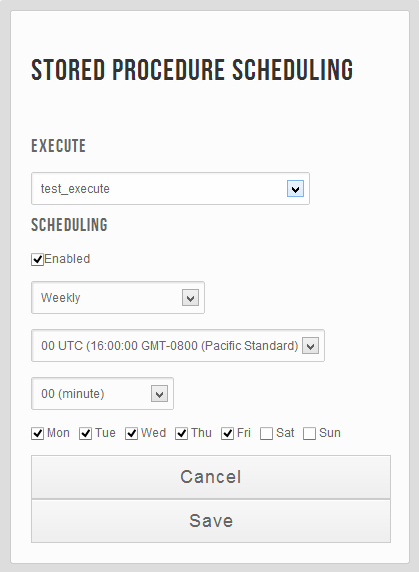
Once you are done configuring the schedule, choose "Save".
At this point you should see your stored procedure in the list. From here, you can see when the stored procedure was last executed. You can also use this list to edit the schedule of your stored procedure and delete the scheduled task.

Security User Credentials
Please ensure that the SQL user that you registered with Cotega has sufficient priviledges to execute this stored procedure.
To allow the Cotega user to be able to execute this stored procedure, please use the following syntax:
GRANT EXEC ON [ProcedureName] TO [COTEGAUSER];
In addition, Cotega needs to be able to list the set of stored procedures you have. As such it needs select access to the sys.procedures table as outlined below.
GRANT SELECT ON sys.procedures TO [COTEGAUSER];
In some cases you will need to grant the [COTEGAUSER] access to the schema of your stored procedures. You will know this is true if you do not see your stored procedure in the list when you add it. To do this execute the following:
GRANT Execute On Schema::[SCHEMA_NAME] To [COTEGA USER]
If you are uncertain which schema your stored procedure is using, the following query which you should run as the admin for your database will help.
SELECT sys.procedures.name as StoredProc, sys.schemas.name as SchemaName
from sys.procedures, sys.schemas where type_desc = 'SQL_STORED_PROCEDURE'
and sys.procedures.schema_id = sys.schemas.schema_id
order by sys.procedures.name